
The project board
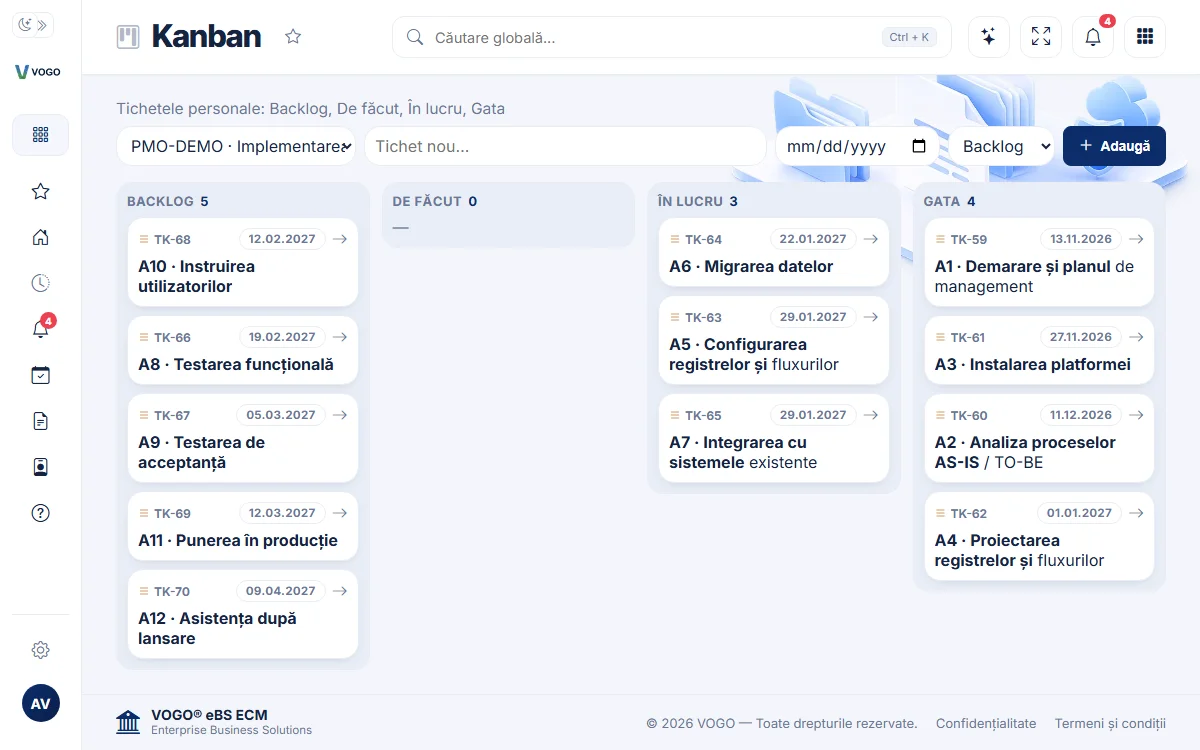
Four columns, read from left to right. Each card shows the ticket code, the priority and the due date, and late tickets stand out at once. The list at the top left picks the project shown.







VOGO eBS · Kanban
Tickets in four columns — Backlog, To do, In progress and Done — with priorities, due dates, reminders and the history of every change.
On a computer, cards are dragged from one column to another; on a phone, the columns come one at a time. The PMO agent's plan becomes tickets on the same board.
Every task is a ticket, and every ticket sits in a column: Backlog, To do, In progress, Done. The board shows at a glance what is waiting, what is being worked on and what is finished, with the priority and due date on every card.
The board shows one project at a time. Each person's own tickets and the tickets of a project stay apart, and a new ticket goes into the project shown.
When needed, the ticket reminds by itself: at the chosen date and time, by phone, e-mail or WhatsApp.
Fewer forgotten tasks. Fewer “who does what” meetings. Everyone sees what they have to do.
Four columns, read from left to right. Each card shows the ticket code, the priority and the due date, and late tickets stand out at once. The list at the top left picks the project shown.
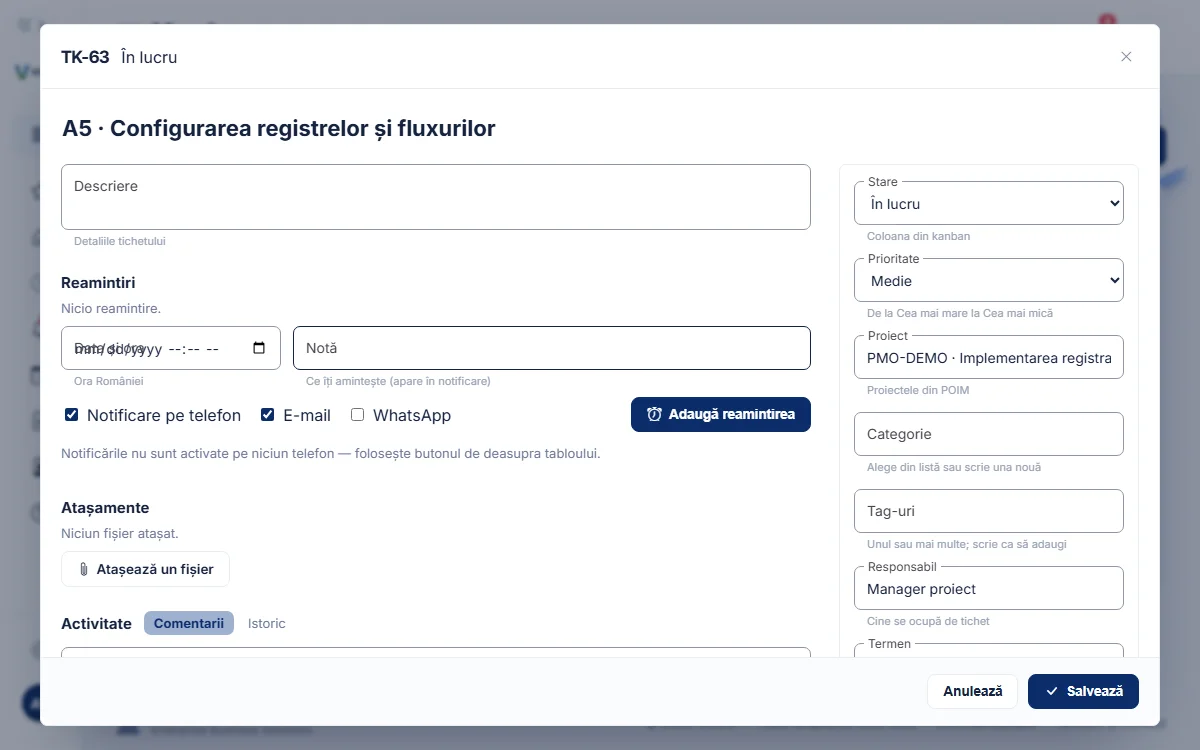
A click on the card opens the ticket: title and description, status, priority, project, category and tags, owner and due date. Below, the reminders, the attachments, the comments and the history of every change.
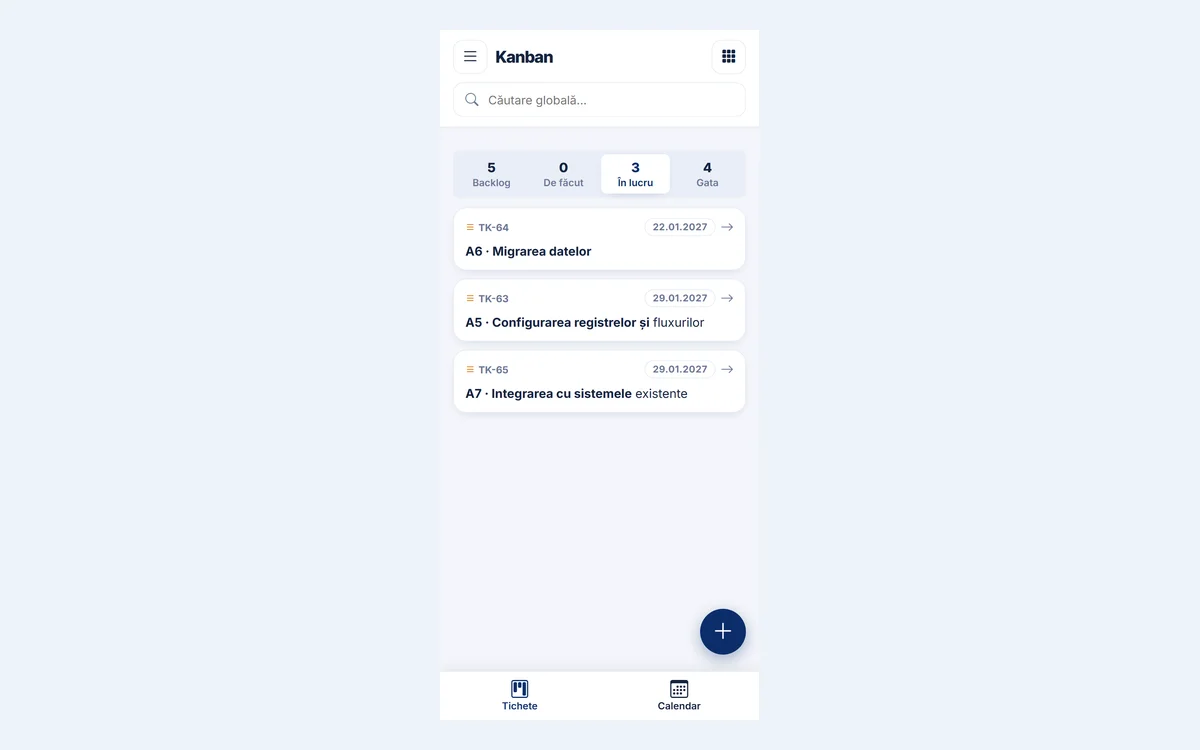
The columns become tabs, each with its number of tickets. The “+” button adds a ticket, the status changes from its sheet, and at the bottom the calendar is one tap away.
The examples in the pictures come from a demo project with a fictitious organisation.
Backlog, To do, In progress and Done. When a ticket reaches Done, the completion date is set by itself.
On a computer, the card is dragged to the new column and the move is saved at once.
The project is picked from a list; the tickets of projects never mix with each other or with personal ones.
From Highest to Lowest; in each column, cards come in order of priority and due date.
A due date and, when needed, a time; late tickets are marked on the board.
At the chosen date and time: a phone notification, an e-mail or a WhatsApp message. A reminder is confirmed or snoozed.
The files of a task stay on its ticket, not in e-mails.
The discussion stays on the ticket, and every change is recorded: what changed, who and when.
Picked from a list or added straight from the ticket, so tickets can be grouped.
By code, title, description or comments, diacritics ignored; a result opens the ticket.
The VOGO agent adds and moves tickets and sets reminders when asked, in conversation.
The plan's activities become tickets in the plan's project, and what reaches Done flows back into the plan's progress.
Everyone sees the project's tickets, takes a task and moves it on to Done.
Their own tickets and reminders, apart from the projects.
The state of each project, column by column, without reports asked for by e-mail.
Priorities, due dates and owners in one place, with the history of every change.
One place for what needs doing — a person's and a project's — each on its own board.
A board with a column for each stage of a task — here Backlog, To do, In progress and Done. Each task is a card moving from left to right, so you see at a glance what is waiting, what is being worked on and what is finished.
Yes. The board shows one project at a time, picked from a list; personal tickets and the tickets of each project stay apart.
Yes. On a phone the columns become tabs, a new ticket is added with the “+” button, and the status changes from the ticket's sheet.
At the date and time set on the ticket: a phone notification (once notifications are turned on for that phone), an e-mail or a WhatsApp message. A reminder is confirmed or snoozed.
Yes. The activities of the plan made by the PMO agent become tickets in the plan's project, with the calculated due dates, and what reaches Done flows back into the plan's progress.
Only the people of the organisation that has the VOGO eBS application; one organisation's data is not visible to another.
A 15-minute demo, on a sample project or on a project of your organisation.