Meniu
Secure & trustworthy Your data is safe
24/7 dedicated support We're always here for you
Trusted partner Solutions for your business

VOGO eBS — Enterprise Business Suite System.
AI powered.

VOGO® eBS AIAO — Enterprise AI Automation and Orchestration Platform

EUIPO EUTM 019103505
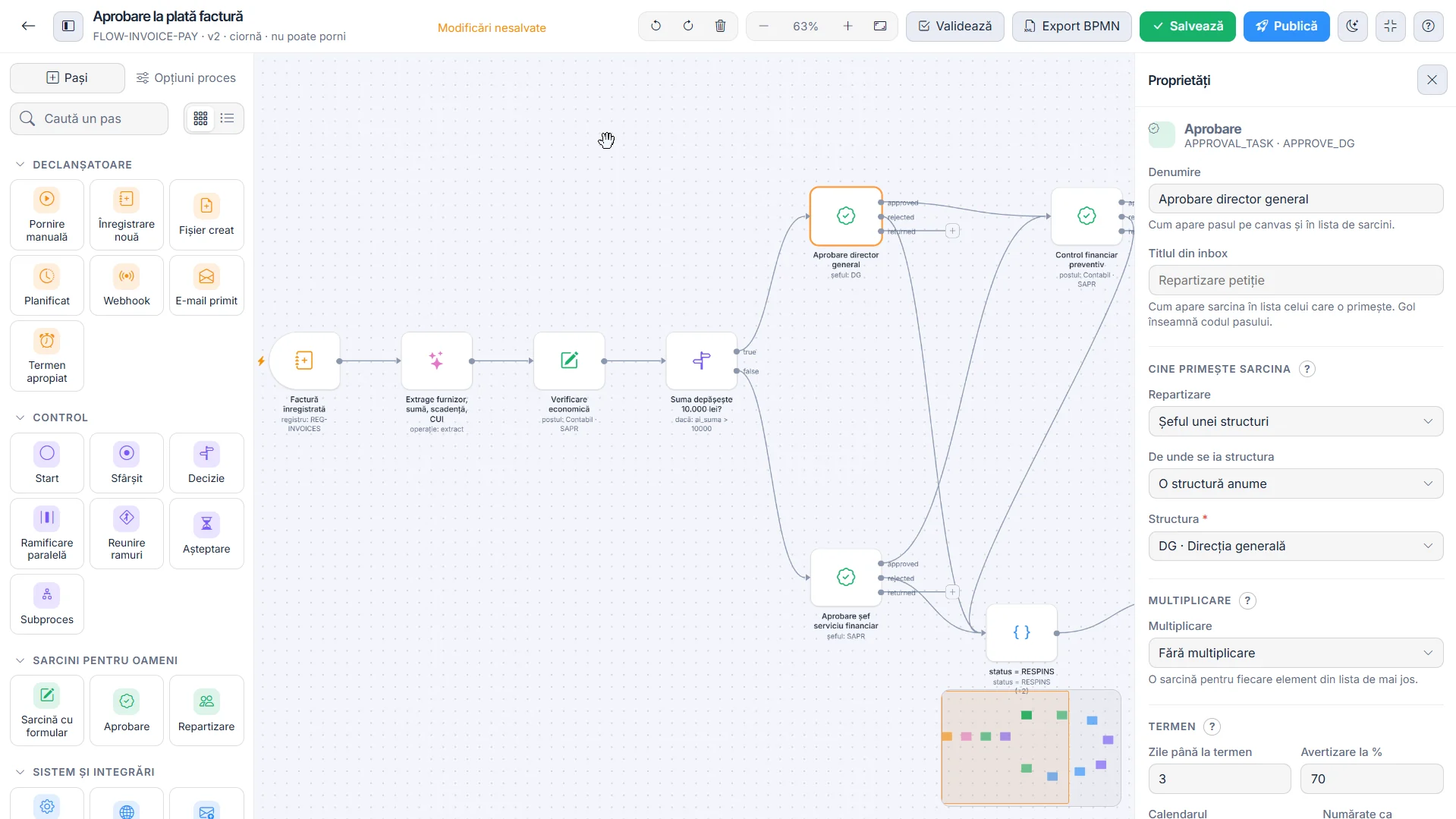
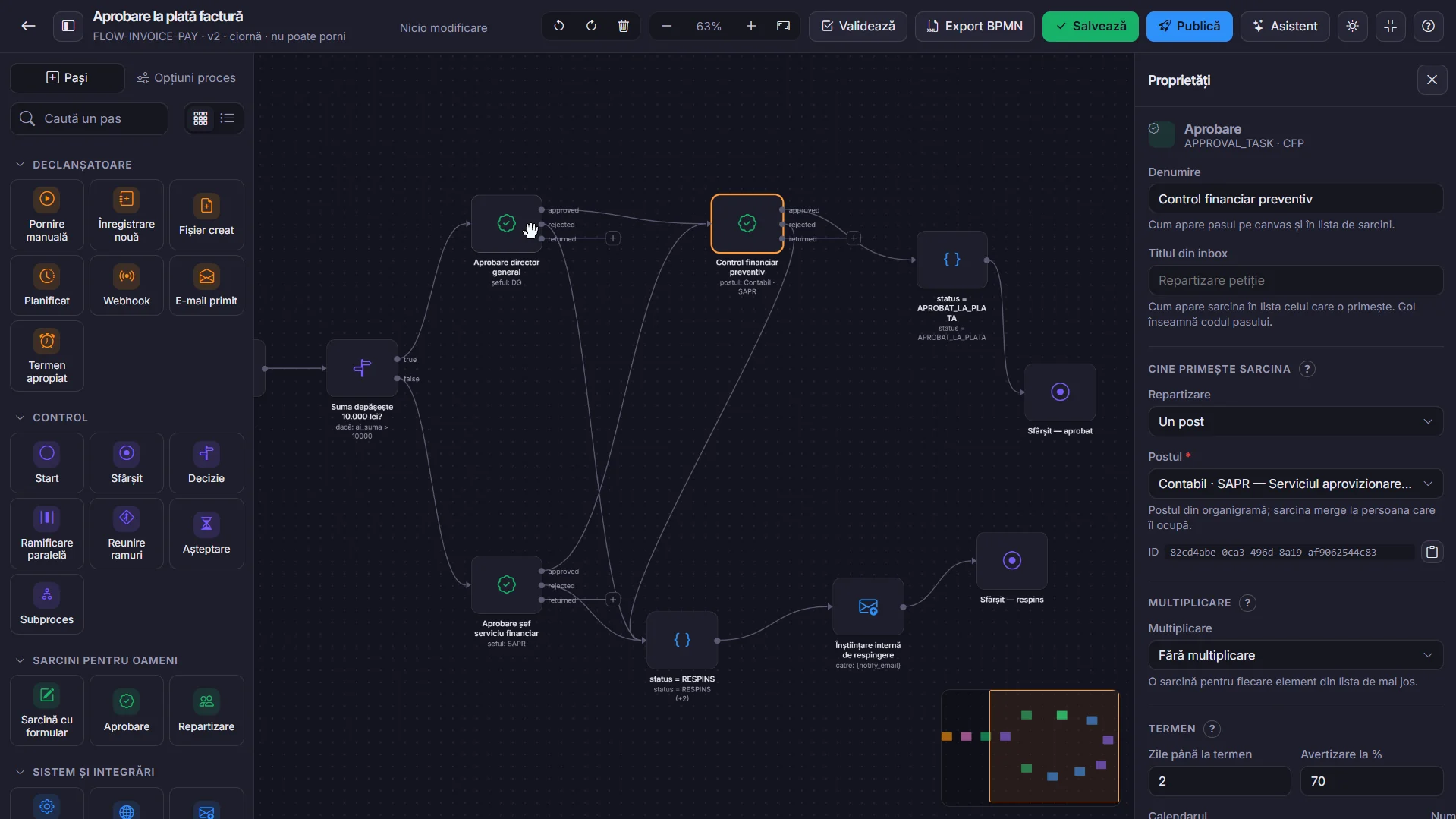
The VOGO eBS AIAO process designer in dark theme: the payment-approval flow of an invoice, with the AI Assistant proposing the process from a plain-language description

VOGO® eBS AIAO — Enterprise AI Automation and Orchestration is the enterprise platform for intelligent automation and end-to-end orchestration of organisational operations. It brings AI agents, models, data, applications and human intervention together in one ecosystem, built on a common core with an append-only audit, tenant isolation and deny-by-default authorisation. The architecture is secure, scalable and portable, with AI governance, full traceability and compliance with European requirements and standards.

Read more about VOGO eBS AIAO

eBS Platform

Core modules

Portal

The users’ entry point into the platform: the start page with the module cards, favourites, recent documents and the day’s operations.

Orders

Taking in, validating and forwarding shop orders to production.

Production

Network demand, the production plan, batches and deliveries: what has to be made today and for whom, actual against plan.

BI & ETL

Network indicators for the chosen period: order count and value, cost structure, distribution by county.

Projects

Integrated management of investment projects (Project Office Integrated Management): the portfolio of funded projects.

Documents

Managing the organisation’s documents across their whole life cycle: the electronic registry, numbered per register.

AIAO

VOGO AI Automation and Orchestration Platform: case handling, workflows, AI automation and integrations.

IAM – Identity & Access Management

Identity and access management: accounts, created only through the identity API of the application.

PAM – Privileged Access Management

Privileged access management: administrative rights are granted only when needed and for as long as needed (just-in-time).

ROeID – Citizen identification

Citizen identification through ROeID, with access to every feature after sign-in and the account created automatically.

Administration

Platform configuration: network shops, units of measure, the product nomenclature and categories, the working calendar, alerts.

VOGO AI

The platform’s intelligent assistant: a conversational agent with retrieval over your own documents, trained on the organisation’s procedures.

Audit & Compliance

The platform’s audit trail: it receives events from every module, validates them, stores them and makes them available.

SIEM – Security events

Collecting, storing, normalising, correlating, analysing and visualising security events, with dashboards, alerts and retention.

IDS – Intrusion detection

Intrusion detection system: real-time traffic analysis, data analysis, attack signatures and alert generation.

Support & Help Desk

Tickets opened from the application, by email or from mobile, with the context attached; ticket flow with tiered escalation.

Mobile

The mobile application’s backend: a versioned, secure API with OAuth2/OpenID Connect sign-in through IAM and ROeID.

Integration

The single point of data exchange with external systems — the organisation’s, the state’s and partners’: the integration catalogue.

DNSH – Resources and environment

Monitoring and reporting energy, water and other resource use, plus energy-efficiency and environmental initiatives.

Processes are modelled no-code, not programmed

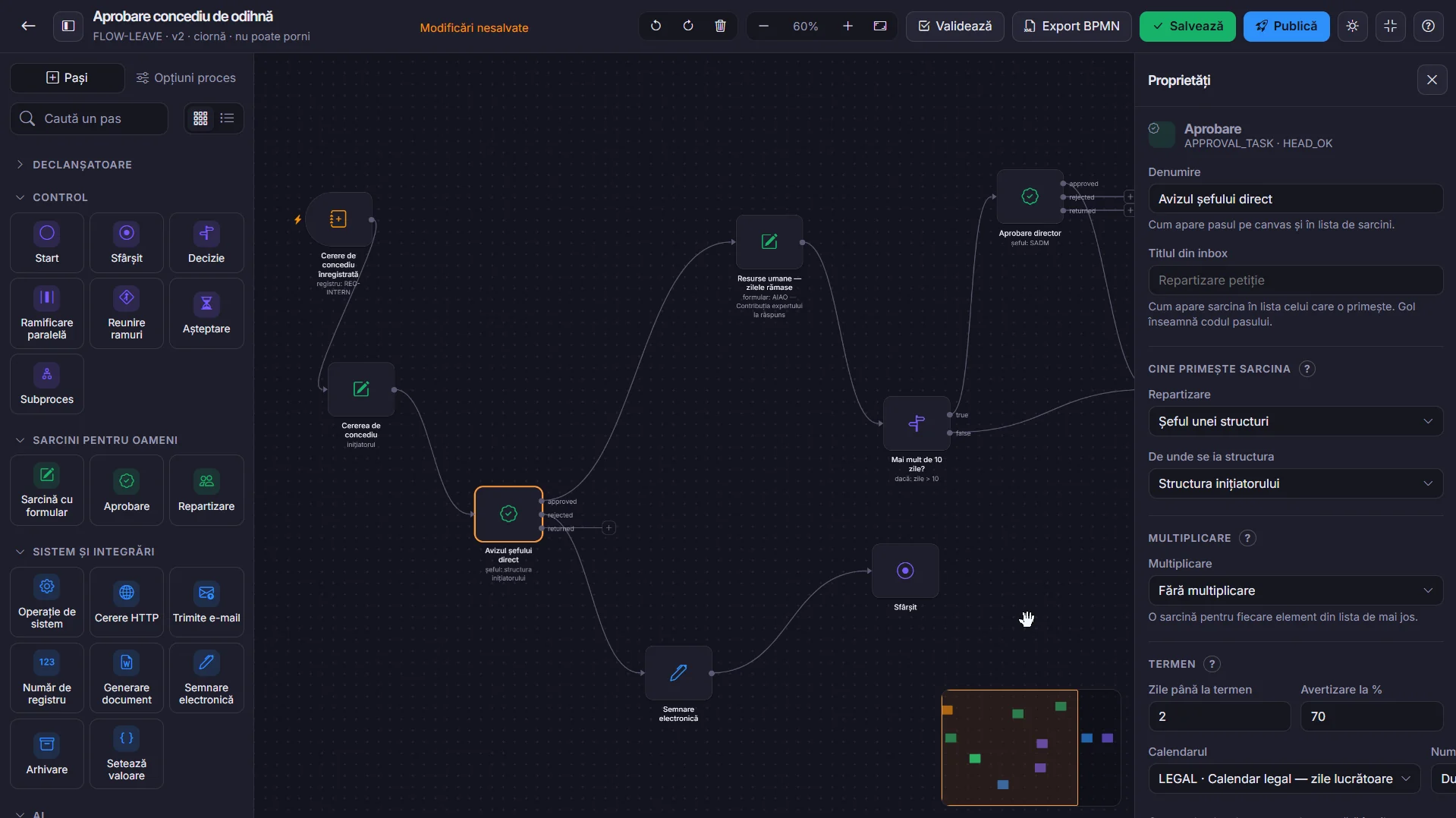
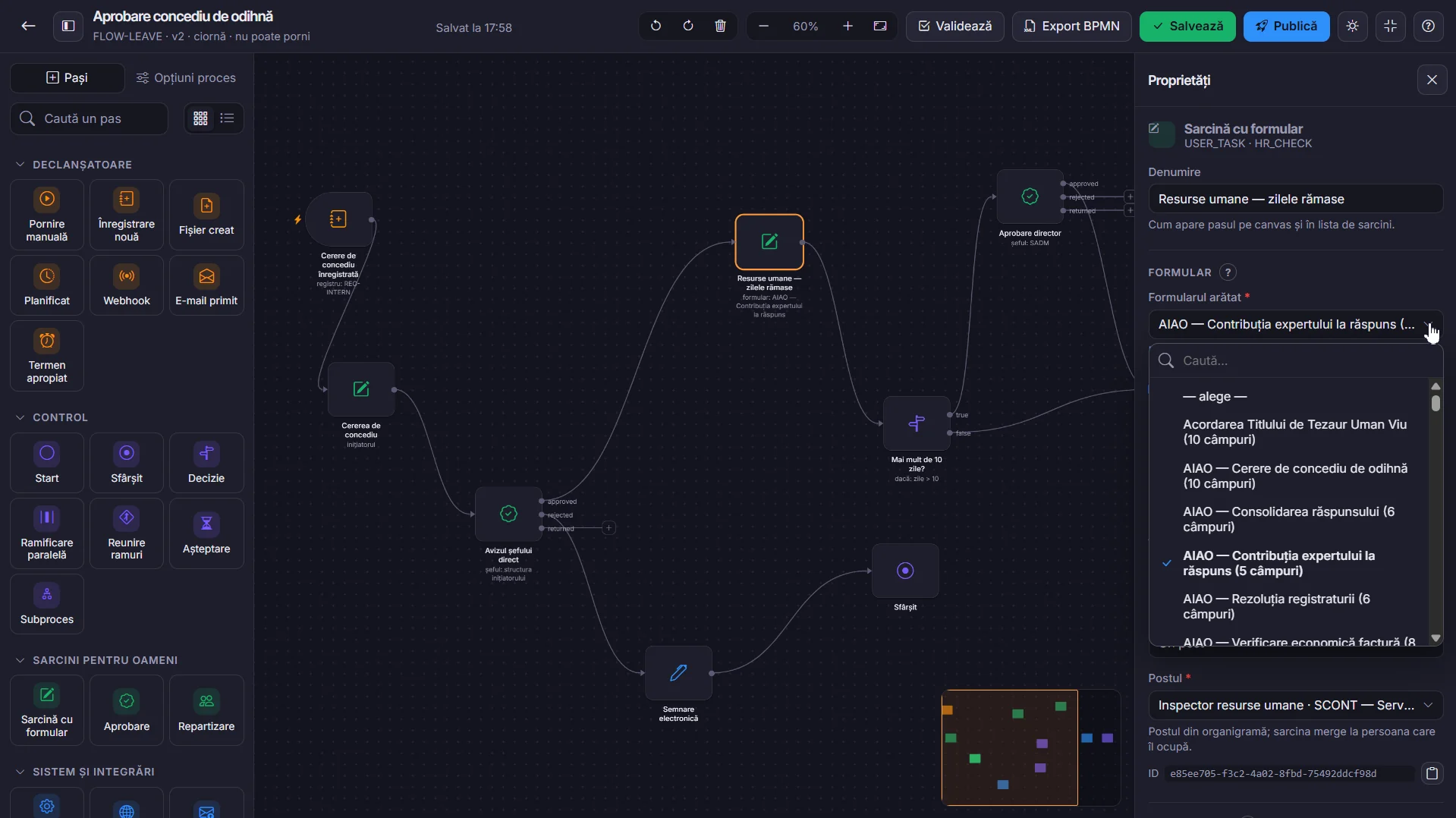
Steps are dragged from the palette onto the canvas: triggers, control — decision, parallel branch, join, wait, sub-process —, tasks for people and system operations. The flow has versions, is validated before publishing and is exported to BPMN 2.0.

The VOGO eBS AIAO process designer: the approval flow of a leave request, with the step palette and the properties panel

AI steps sit in the same visual designer

Classifying the document, extracting the data, summarising, drafting the reply and signing electronically are steps like any other. When the agent is not certain, the step goes to a person — the decision stays where it belongs.

The process designer in light mode, with automation steps and AI steps in the same flow

Forms are built visually, not in code

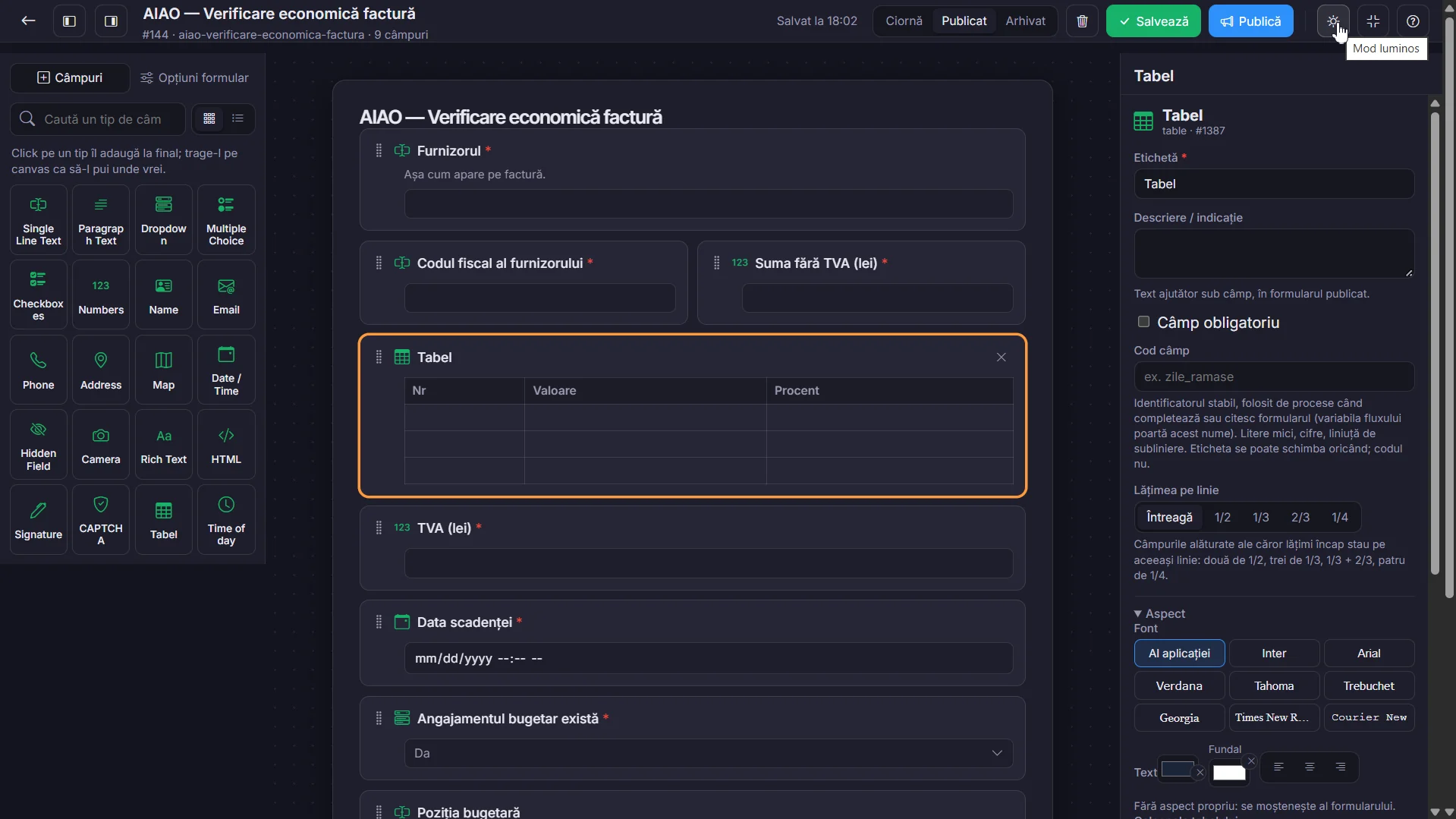
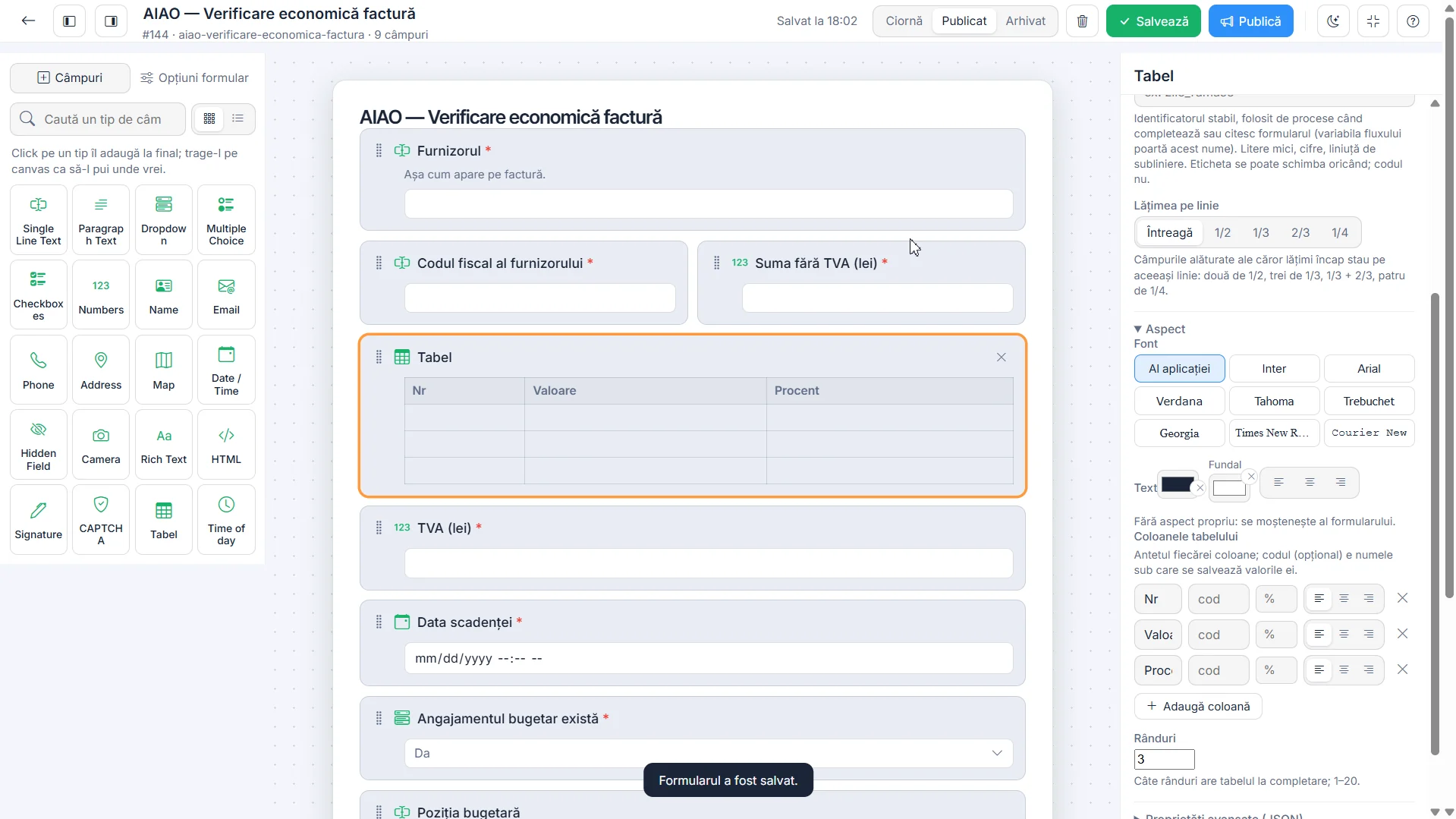
Text, numbers, dates, choices, a table with its own columns, signature, map, file. Every field has its own width on the row and a stable code under which its value is read further on in the process. A form has a draft, a published version and an archive.

The VOGO eBS AIAO form designer in dark mode: the financial-check form of an invoice, with the field palette and the table properties

The form sits next to its step

A task step receives the form a person fills in, and the data goes straight into the process variables. There is no second place in which to keep the same fields.

Attaching a form to a process step in the VOGO eBS AIAO designer

The same screen, in dark/light theme

The theme changes with one button, for each user. The same fields, the same properties, the same layout — only the contrast changes, for the eye that spends all day in the application.

The VOGO eBS AIAO form designer in dark theme
Dark theme
The VOGO eBS AIAO form designer in light theme
Light theme
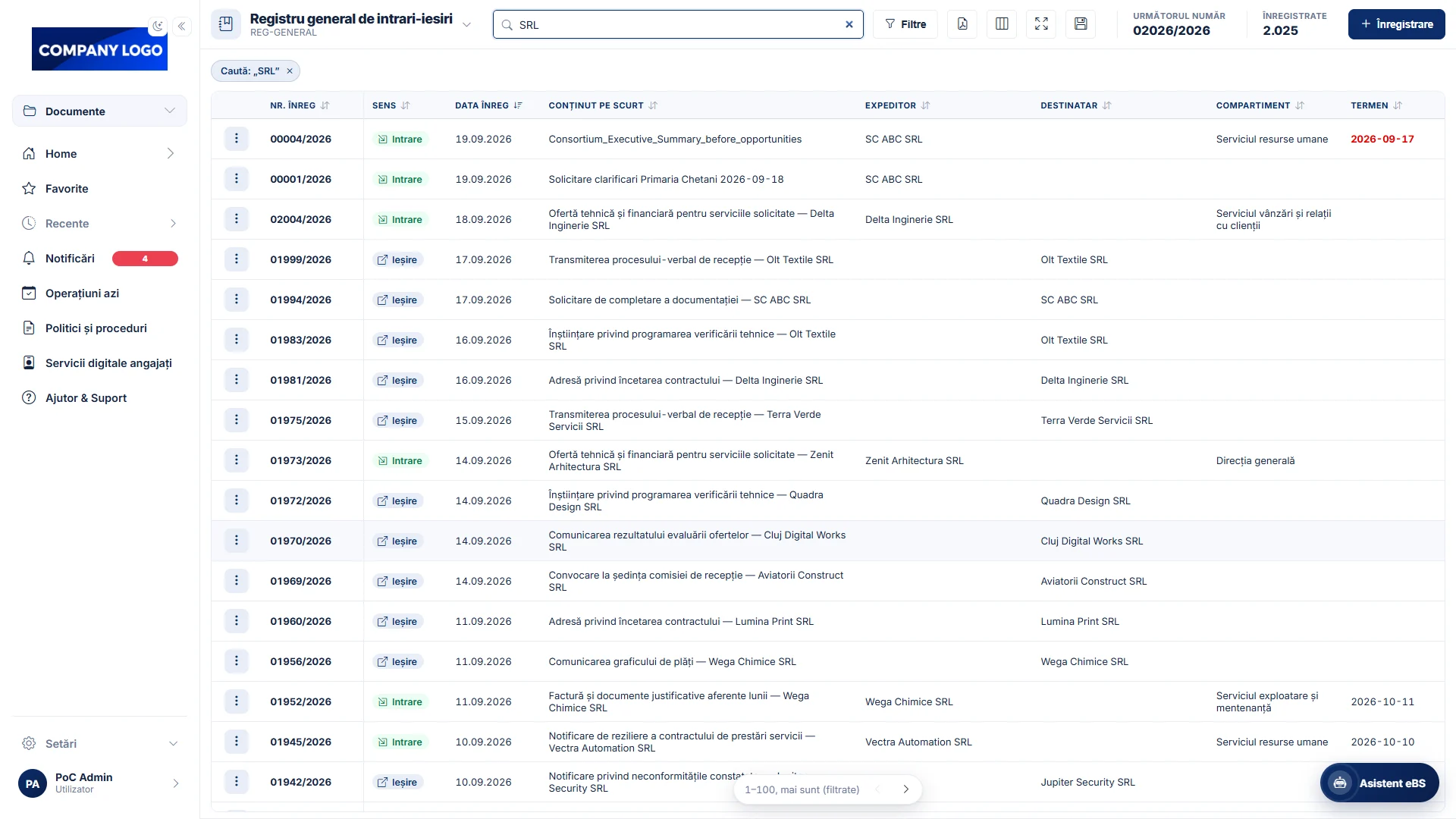
The general incoming/outgoing register of VOGO eBS ECM Registry, full screen, in light theme
Registry — light theme
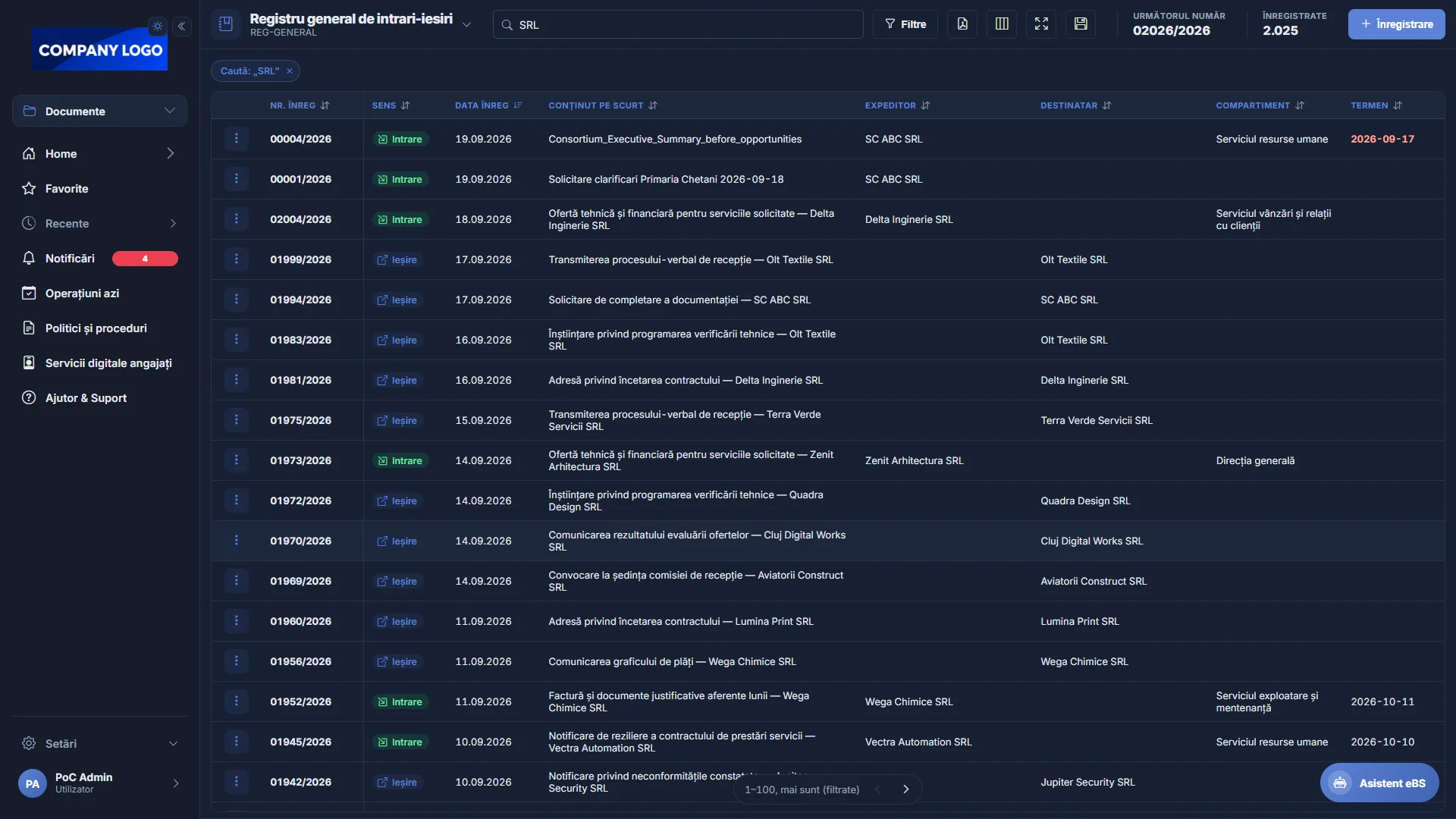
The general incoming/outgoing register of VOGO eBS ECM Registry, full screen, in dark theme
Registry — dark theme

The orchestrator

Where the process takes shape: steps are dragged from the palette, linked to one another and configured in the panel on the right. Nothing that follows requires code.

The palette, grouped by what each step does

  • Triggers — where the process starts.
  • Control — start, end, decision, parallel branch, join, wait, sub-process.
  • Tasks for people — task with a form, approval, assignment.
  • System and integrations — system operation, HTTP request, sending e-mail, register number, document generation, electronic signing, archiving, setting a value.
  • AI — the steps in which the agent works.
The VOGO eBS AIAO process designer, with the step palette on the left and the step properties on the right

What is configured on a step

  • The name on the canvas and the title under which the task appears in the list of whoever receives it.
  • Who receives it: a person, a group, the head of a unit or the initiator’s unit.
  • Multiplication: one task for every item in a list.
  • The deadline: days until due, the warning threshold and the calendar by which days are counted.
The payment-approval flow of an invoice in VOGO eBS AIAO: a decision on the amount, chained approvals and the two endings

Versions

Every flow has its own versions; one is in progress, another is published.

Validation

The flow is checked before publishing, and anything that cannot start is flagged on the spot.

BPMN export

The definition is exported to BPMN 2.0, the standard format for processes.

Publishing

A process goes live only once it is published, not while it is a draft.

Forms are defined visually

The form is where the process receives its data. It is made of fields dragged onto the canvas, each with its own properties, without a line of code.

Field types

Single-line text, paragraph, drop-down list, multiple choice, checkbox, numbers, name, e-mail, phone, address, map, date and time, time, hidden field, rich text, HTML, camera, signature, CAPTCHA and table.

What is set on each field

  • The code — the stable identifier under which the process reads and writes the value. The label can change at any time; the code cannot.
  • Width on the row — full, 1/2, 1/3, 2/3 or 1/4, and neighbouring fields that fit sit on the same row.
  • Required and the help text under the label.
  • The table — its own columns, with header, code and alignment, and the number of rows when filled in.
The VOGO eBS AIAO form designer in dark theme: the field-type palette, the form on the canvas and the properties of the selected field

The agent proposes the fields, the person arranges them

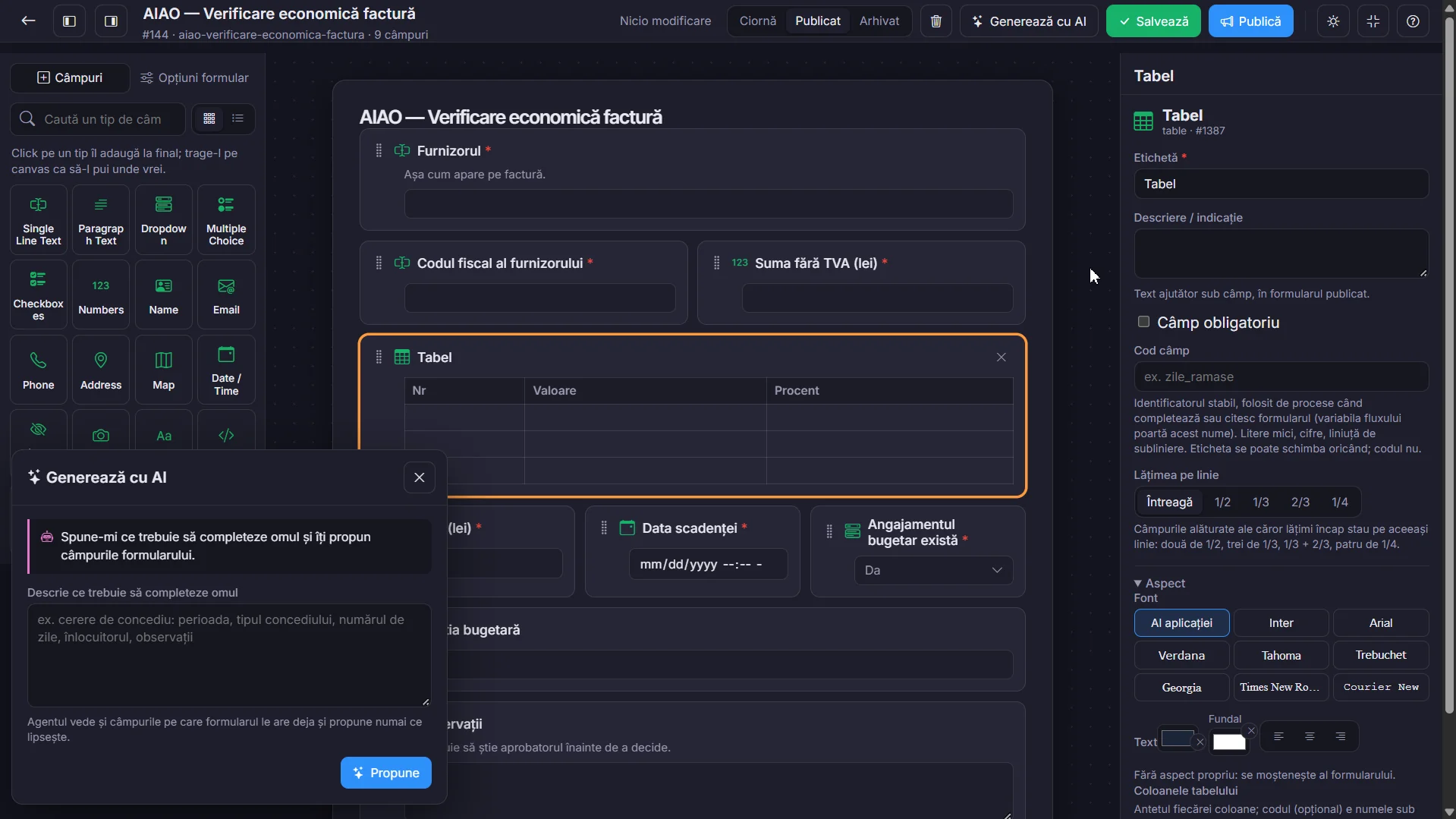
You say in words what the person has to fill in — “leave request: period, leave type, number of days, replacement, remarks” — and the agent proposes the fields, with the type and label of each.

  • The agent sees the form as it is and proposes only what is missing, without rewriting what you have already built.
  • The proposal is accepted, changed or rejected field by field; nothing enters the form without the person confirming it.
  • After that, every field is yours: code, width on the row, required, appearance.
The Generate with AI panel of the VOGO eBS AIAO form designer: you describe what has to be filled in and the agent proposes the fields

Draft

The form is worked on without affecting the processes that are running.

Published

The version people fill in within their tasks.

Archived

A form taken out of use remains, for the older records.

Appearance

Font and colours inherited from the application or set per field.

VOGO eBS ECM Registry

The Digital Registry - VOGO Orchestration and Automation Platform

The component through which the institution keeps its document registers. The system does the numbering, a registered entry is never deleted, and every operation goes into the audit log.

Registers are configured, not coded

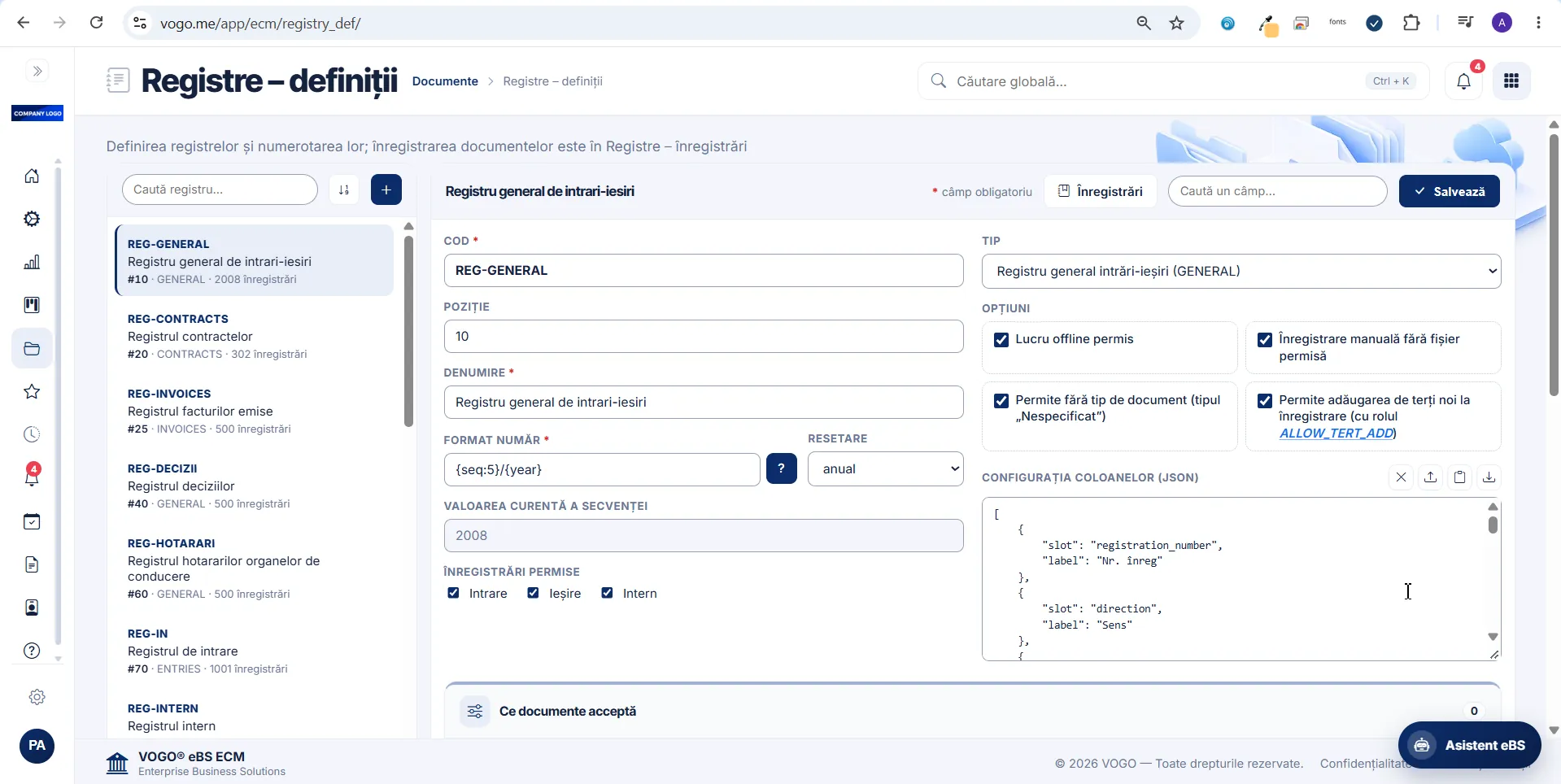
Every register carries its own code, number format, yearly sequence reset and the entry types it allows — incoming, outgoing, internal. Its columns and the documents it accepts are configured from the same page.

The Registers — definitions screen: the list of registers and the configuration form of one register

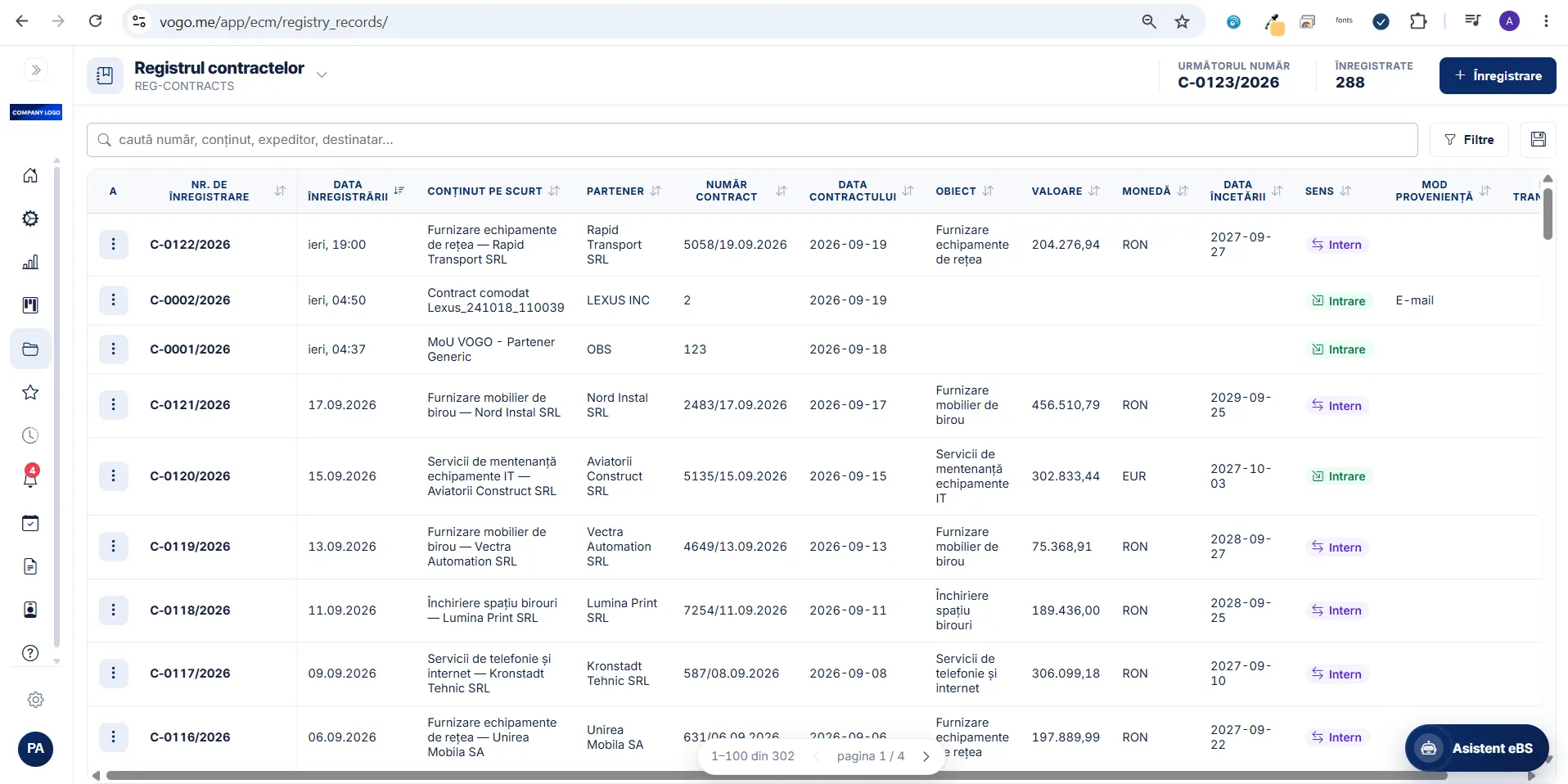
The general register of incoming and outgoing documents

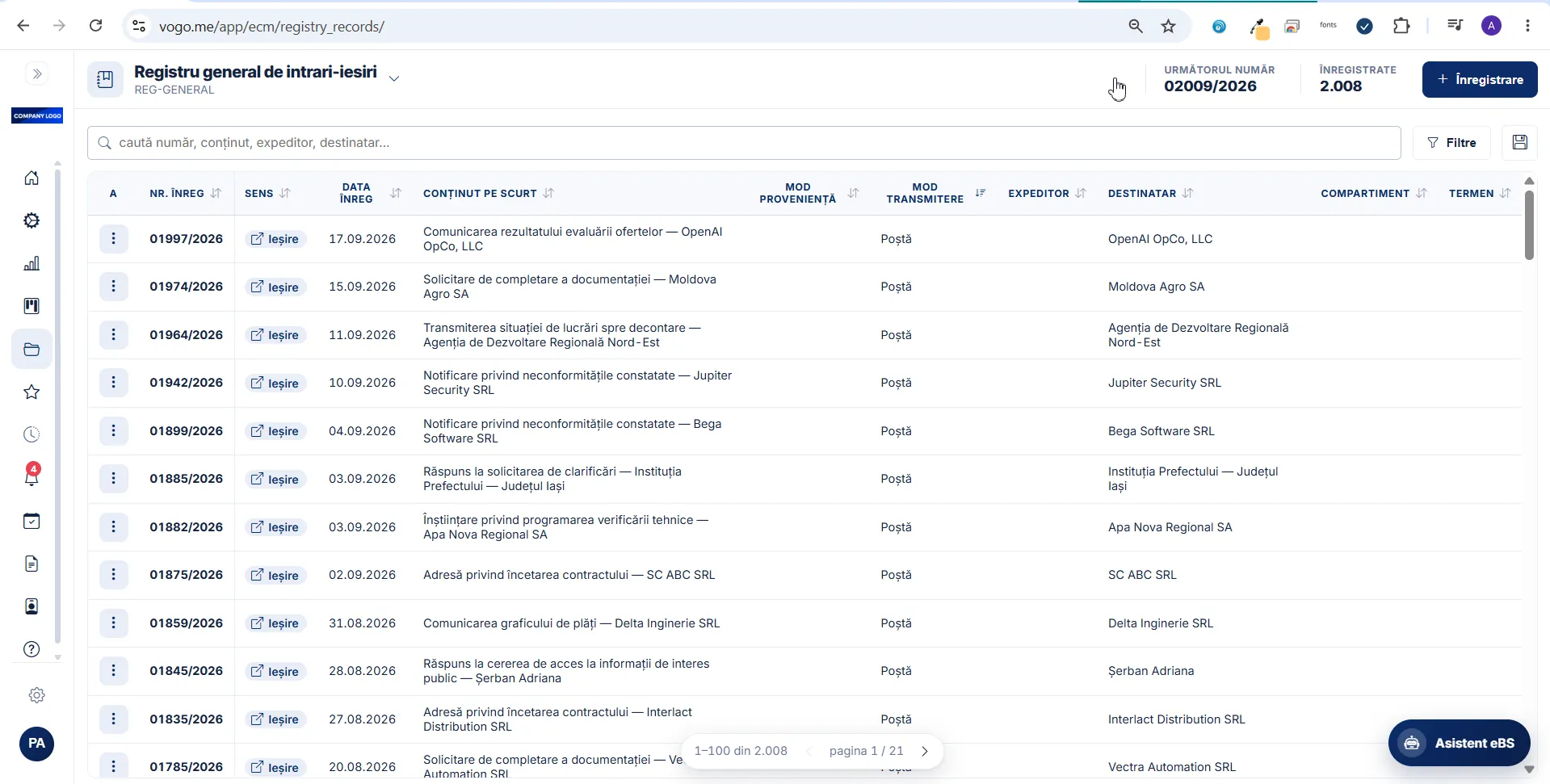
Direction, date, short content, sender, recipient, department and deadline, all on the same entry. The next number is visible before the entry is created, and search and filters run across the whole register.

The general register of incoming and outgoing documents, with its entries and their columns

Every register with its own columns

The contracts register does not carry correspondence fields: partner, contract number and date, subject, value, currency and end date. The same numbering rules, a different set of data.

The contracts register, with partner, value, currency and end date

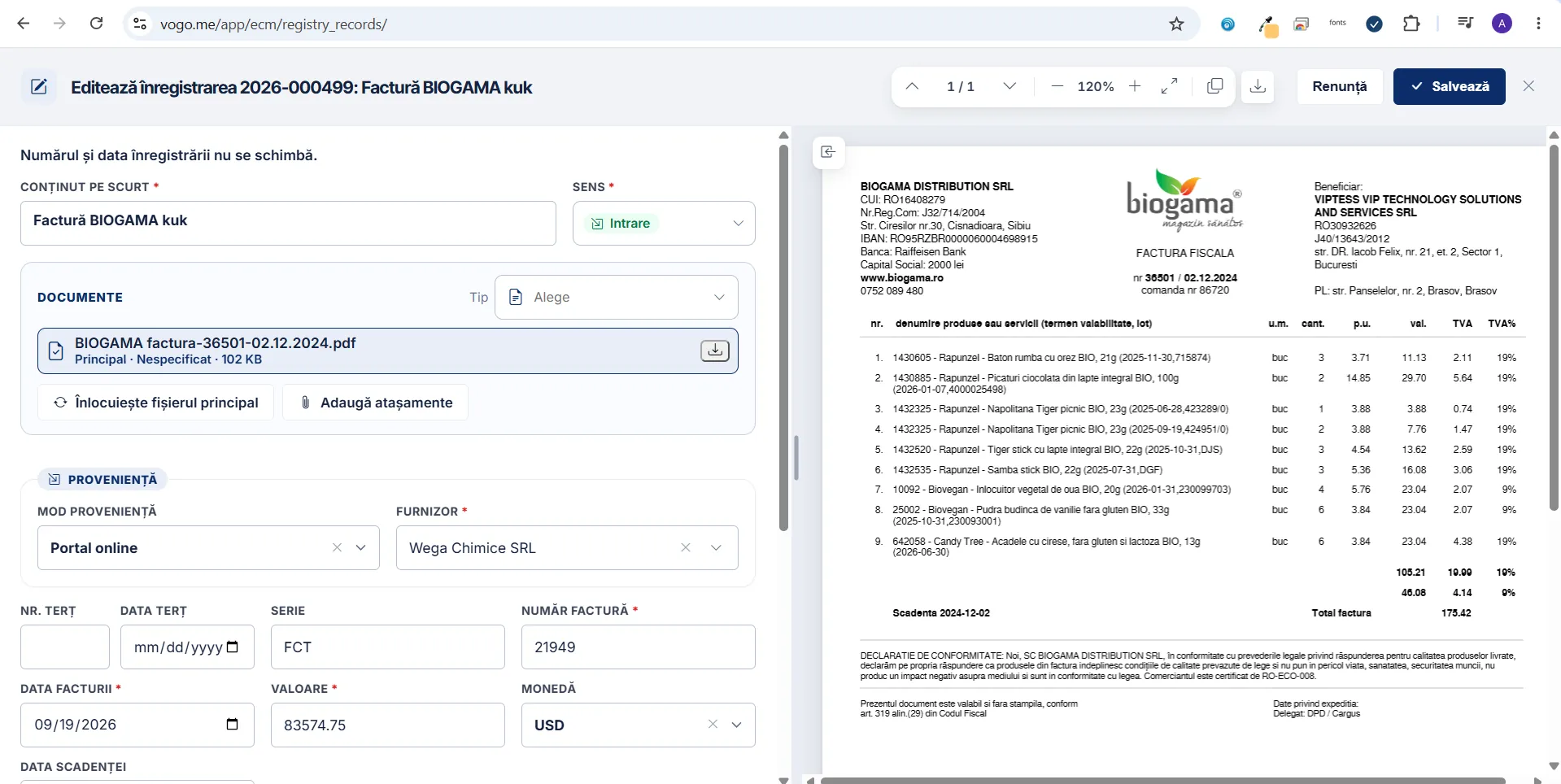
The document, next to the entry

The main file and the attachments are read on the right, while the origin, the supplier and the invoice data are filled in on the left. The registration number and date stay unchanged.

Editing an entry, with the document preview alongside
Authentication & identity

Verified digital identity

Native integrations with national and European electronic identification systems — no redundant manual data entry.

ROeID

Digital identification of individuals, with data from the ROeID profile pre-filled automatically in forms and the personal ID number masked.

eIDAS

Recognition of electronic identity at European level, for users from across the Union.

ONRC / SPV

Company data obtained automatically — name, tax ID, legal representative — by selecting it from SPV.

Accounts differentiated by profile

Citizen, veterinarian, company — each profile with its own features and information.

Flexible access, simple upgrade

Sign-in with your own username and password or anonymously, with the option to upgrade to a verified ROeID account.

A complete digital flow

An intuitive multi-step wizard with a visual progress indicator, taking any request from opening to official confirmation.

01

Description

Deadlines, costs and required attachments, set out clearly before you start.

02

Form

Fields pre-filled automatically from ROeID and ONRC, with an integrated GIS map for location.

03

Preview

A full check of the completed, signed form before submission.

04

Submission

Automatic registration number, signed PDF and real-time tracking of the request status.

Integrated GIS mapA map field with coordinates filled in on click, for locating requests geographically.
Digital handwritten signatureA signature module right in the browser, with the mouse or a finger on a touch screen.
Automatically generated PDFThe signed request is generated as a PDF, available for download or sending by email.
Validated attachmentsRequired documents are attached straight from the browser, with file type and size validation.
Automatic pre-fillingFields are filled with data from ROeID and ONRC, removing redundant manual entry.
Confirmation & trackingSubmission is confirmed with a registration number, and the request status can be tracked.
GATESCANNER® SECURITY DOME

Multi-channel file transfer and sharing, with built-in CDR sanitisation

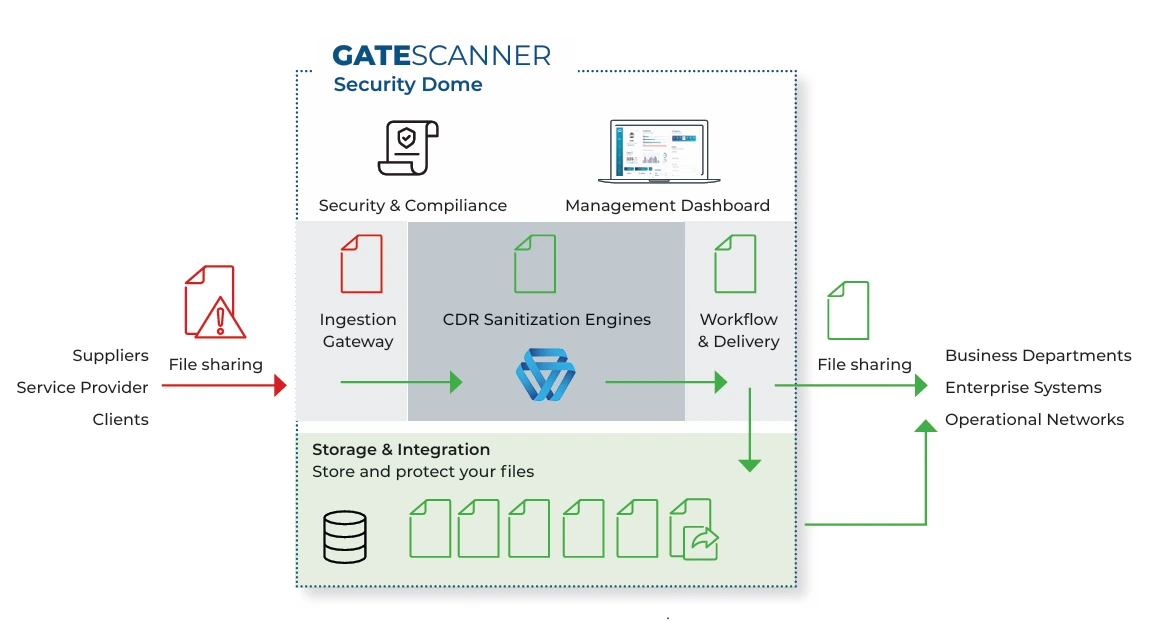
An enterprise platform for secure, automated collaboration on files. It applies a zero-trust policy to every file-based data flow through deterministic CDR sanitisation technology — Content Disarm and Reconstruction —, which prevents known, unknown and zero-day threats without relying on detection.

GateScanner Security Dome architecture: incoming files pass through the ingestion gateway, the CDR sanitisation engines and controlled delivery to internal systems

Stops threats before they get in

CDR neutralises known, unknown and zero-day attacks on the spot, without waiting for signature updates.

Scaling without downtime

Large file volumes, with nodes added on the fly and no downtime.

Productivity without friction

Users work as usual in network folders, in the browser, in Outlook and with USB sticks, while sanitisation happens transparently.

Fewer products, lower cost

One platform instead of several point solutions, with unified control over every file channel.

Provable compliance

Immutable logs and SIEM integration, for auditors and regulators.

Deploy where you choose

On-premises, private cloud or SaaS, to suit the organisation’s infrastructure and requirements.

Over 300 file types

MS Office, PDF, images, archives, password-protected files and specialised formats, processed recursively, including inside archives.

API integration

REST API with an OpenAPI specification, for automation and integration with the organisation’s SOAR platforms.

Technical specifications

CDR engineDeterministic content disarm and reconstruction, independent of detection
File typesOver 300 — MS Office, PDF, images, archives, password-protected files, specialised formats
RemovalMacros, scripts, embedded objects, hyperlinks and malicious elements, policy-based
ProcessingRecursive, in depth, including embedded files and archives
ArchitectureActive-Active CDR processing grid
ScalingHorizontal, without downtime, with nodes added on the fly
File transferNetwork shares (SMB/CIFS), SFTP, FTPS, cloud storage (S3, Azure Blob)
AutomationScheduled, triggered or event-driven flows between any two defined endpoints
APIREST, with an OpenAPI (Swagger) specification, for integration with SOAR platforms
Access controlRBAC with AD/LDAP, SAML 2.0 and OpenID Connect
AuditImmutable logs for every file action, with structured SIEM-compatible export
SharingPassword-protected, time-limited links and folders
Multi-tenantMulti-tenant and multi-domain support, for MSSPs and segmented organisations
On-premisesVirtual appliance on VMware vSphere or Hyper-V
Private cloudAWS, Azure, Google Cloud Platform
SaaSFully hosted and managed in the cloud


Workstation integrations

GateScanner for Web Browsers

An extension for Chrome, Edge and Firefox. It intercepts browser downloads, sends them for sanitisation and delivers the rebuilt file, neutralising malicious web content.
GateScanner for Outlook

A VSTO add-in. It uploads the attachment to a vault in one click and replaces it with a sanitised link, gets past the mail server’s size limit and stops exfiltration.

GateScanner Virtual USB Kiosk

Turns a workstation into a secure point for importing from removable media, with a single permitted flow: selecting the files and sanitising them.

GateScanner for Network Shares

Network folders (SMB/CIFS) are monitored: a dropped file is picked up, sanitised and put back, without users changing the way they work.

Certifications

Real credibility, validated products

We deliver robust, documented and compliant products. From security and data protection to intellectual property and compliance, we build validated software applications aligned with business environments where trust is earned through evidence.

ISO 9001 certification
ISO 9001
ISO 27001 certification
ISO 27001
ISO 20000-1 certification
ISO 20000-1
ISO IMAB accreditation
IMAB
RS 8000 certification
RS 8000
EUIPO certification
EUIPO
SOC 2 Ready certification
SOC 2 Ready
GDPR by Design compliance
GDPR by Design
Hosted in EU Made in EUROPE

Coverage

Global contacts.

VOGO — global contact network
Request a demo

Let’s see VOGO at work

Fill in the form and we will come back with a demo built on your use case.

Note: The services are provided in line with the European DNSH principle – “Do No Significant Harm”, in accordance with Article 17 of Regulation (EU) 2020/852 on the establishment of a framework to facilitate sustainable investment and with the European Commission’s technical guidance on the application of the DNSH principle, C/2023/111.